Deep Learning on OMOP Data in EHRData with PyPOTS#
This tutorial demonstrates how to quickly apply machine learning to OMOP data using PyPOTS, a powerful toolkit for time series analysis [Du23].
Prerequisites: Complete the OMOP Introduction tutorial first to understand how to load OMOP data into EHRData.
Use Case: ICU Mortality Prediction#
We’ll predict in-hospital mortality for ICU patients using the MIMIC-IV demo dataset in OMOP format [RJJ+20] [GAG+00].
Note
This is a demonstration example. Real clinical prediction requires more sophisticated preprocessing, validation, and careful consideration of clinical context.
What is PyPOTS?#
PyPOTS provides state-of-the-art neural network models for time series tasks:
Imputation - Fill missing values in incomplete time series
Classification - Predict outcomes from time series
Forecasting - Predict future values
Clustering - Group similar patients
PyPOTS works seamlessly with EHRData objects!
Setup and Installation#
%pip install pypots
# PyPOTS requires this for scipy compatibility
import os

os.environ["SCIPY_ARRAY_API"] = "1"

import ehrdata as ed
import duckdb
import pandas as pd
import torch
from pypots.classification import BRITS
Setup Database and Download Data#
# Create database connection
con = duckdb.connect(":memory:")

# Download MIMIC-IV OMOP demo data
ed.dt.mimic_iv_omop(backend_handle=con)
Define the Cohort#
We’ll focus on ICU patients by filtering visit_occurrence for ICU stays using OMOP concept IDs:
4305366: Surgical ICU
40481392: Medical ICU
32037: Intensive Care
763903: Trauma ICU
4149943: Cardiac ICU
We apply two key filters:
Duration: Only ICU stays >24 hours (to ensure sufficient data for 24-hour analysis)
First visit: If a patient had multiple ICU stays, we select their first ICU visit
We do this here with SQL, operating on our (and any other) OMOP CDM database; SQL by for instance OHDSI’s ATLAS tool can also be used in such a context!
Alternative, the EHRData object can be filtered afterwards, working completely in Python (with less control over the “raw” data as you have it with SQL, though).
# Filter for first ICU visit per patient (>24 hours only)
con.execute("""
    WITH RankedVisits AS (
        SELECT
            v.*,
            vd.*,
            ROW_NUMBER() OVER (PARTITION BY v.person_id ORDER BY v.visit_start_date) AS rn
        FROM visit_occurrence v
        JOIN visit_detail vd USING (visit_occurrence_id)
        WHERE vd.visit_detail_concept_id IN (4305366, 40481392, 32037, 763903, 4149943)
            AND date_diff('hour', v.visit_start_date, v.visit_end_date) > 24
    ),
    first_icu_visit_occurrence_id AS (
        SELECT visit_occurrence_id
        FROM RankedVisits
        WHERE rn = 1
    )
    DELETE FROM visit_occurrence
    WHERE visit_occurrence_id NOT IN (SELECT visit_occurrence_id FROM first_icu_visit_occurrence_id)
""")

# Check how many ICU visits remain
n_visits = con.execute("SELECT COUNT(*) FROM visit_occurrence").fetchone()[0]
print(f"ICU cohort: {n_visits} patients (first ICU visit >24h only)")
ICU cohort: 99 patients (first ICU visit >24h only)
Build EHRData from OMOP#
Now we construct the EHRData object using ICU visit start as the time reference (t=0) for each patient:
# Step 1: Setup observations from person + visit_occurrence
edata = ed.io.omop.setup_obs(
    backend_handle=con,
    observation_table="person_visit_occurrence",  # Each row = one ICU visit
    death_table=True,
)

print(f"Created EHRData with {edata.n_obs} ICU visits")
edata.obs.head()
Created EHRData with 99 ICU visits
| person_id | gender_concept_id | year_of_birth | month_of_birth | day_of_birth | birth_datetime | race_concept_id | ethnicity_concept_id | location_id | provider_id | ... | admitting_source_value | discharge_to_concept_id | discharge_to_source_value | preceding_visit_occurrence_id | death_date | death_datetime | death_type_concept_id | cause_concept_id | cause_source_value | cause_source_concept_id | |
|---|---|---|---|---|---|---|---|---|---|---|---|---|---|---|---|---|---|---|---|---|---|
| 0 | 4239478333578644568 | 8507 | 2111 | None | None | NaT | 8527 | 0 | None | None | ... | PHYSICIAN REFERRAL | 581476 | HOME | <NA> | NaT | NaT | NaN | NaN | NaN | NaN |
| 1 | -8090189584974691216 | 8507 | 2118 | None | None | NaT | 8527 | 0 | None | None | ... | EMERGENCY ROOM | 581476 | HOME | <NA> | NaT | NaT | NaN | NaN | NaN | NaN |
| 2 | 2161418207209636934 | 8507 | 2060 | None | None | NaT | 2000001401 | 0 | None | None | ... | TRANSFER FROM HOSPITAL | 8863 | SKILLED NURSING FACILITY | <NA> | NaT | NaT | NaN | NaN | NaN | NaN |
| 3 | 1532249960797525190 | 8532 | 2106 | None | None | NaT | 2000001405 | 0 | None | None | ... | EMERGENCY ROOM | 581476 | HOME HEALTH CARE | <NA> | NaT | NaT | NaN | NaN | NaN | NaN |
| 4 | 2288881942133868955 | 8532 | 2102 | None | None | NaT | 8527 | 0 | None | None | ... | EMERGENCY ROOM | 581476 | HOME HEALTH CARE | <NA> | NaT | NaT | NaN | NaN | NaN | NaN |
5 rows × 41 columns
# Step 2: Extract measurements from the first 24 hours
edata = ed.io.omop.setup_variables(
    edata=edata,
    backend_handle=con,
    layer="measurements",
    data_tables=["measurement"],
    data_field_to_keep={"measurement": "value_as_number"},
    interval_length_number=1,
    interval_length_unit="h",  # Hourly intervals
    num_intervals=24,  # First 24 hours
    aggregation_strategy="last",
    enrich_var_with_feature_info=True,
    instantiate_tensor=True,
)

edata
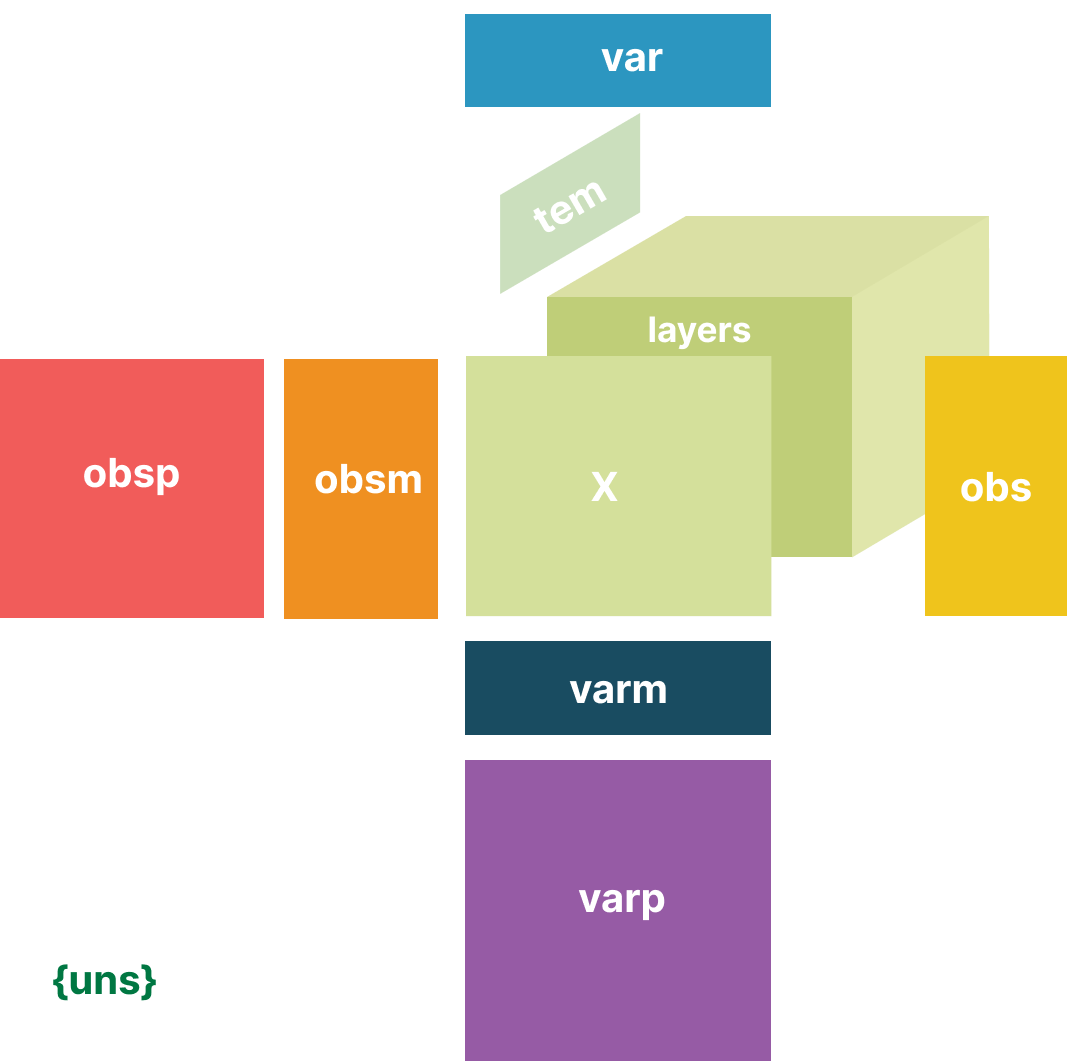
EHRData object with n_obs × n_vars × n_t = 99 × 450 × 24
    obs: 'person_id', 'gender_concept_id', 'year_of_birth', 'month_of_birth', 'day_of_birth', 'birth_datetime', 'race_concept_id', 'ethnicity_concept_id', 'location_id', 'provider_id', 'care_site_id', 'person_source_value', 'gender_source_value', 'gender_source_concept_id', 'race_source_value', 'race_source_concept_id', 'ethnicity_source_value', 'ethnicity_source_concept_id', 'visit_occurrence_id', 'person_id_1', 'visit_concept_id', 'visit_start_date', 'visit_start_datetime', 'visit_end_date', 'visit_end_datetime', 'visit_type_concept_id', 'provider_id_1', 'care_site_id_1', 'visit_source_value', 'visit_source_concept_id', 'admitting_source_concept_id', 'admitting_source_value', 'discharge_to_concept_id', 'discharge_to_source_value', 'preceding_visit_occurrence_id', 'death_date', 'death_datetime', 'death_type_concept_id', 'cause_concept_id', 'cause_source_value', 'cause_source_concept_id'
    var: 'data_table_concept_id', 'data_table_concept_id_mapped', 'concept_id', 'concept_name', 'domain_id', 'vocabulary_id', 'concept_class_id', 'standard_concept', 'concept_code', 'valid_start_date', 'valid_end_date', 'invalid_reason'
    tem: '0', '1', '2', '3', '4', '5', '6', '7', '8', '9', '10', '11', '12', '13', '14', '15', '16', '17', '18', '19', '20', '21', '22', '23'
    uns: 'omop_io_observation_table', 'unit_report_measurement'
    layers: 'measurements'
    shape of .measurements: (99, 450, 24)
Task 2: Mortality Prediction with BRITS#
Now let’s predict in-hospital mortality using BRITS, which handles missing values during classification.
First, prepare labels from the extracted OMOP’s death table:
For a simplistic cohort design we select only people that survived the first 24h of their ICU visit.
We consider the prediction task of predicting death after 24h of their ICU visit begin up to 7 days after the end of their ICU visit.
# Filter for patients surviving the first 24h
edata = edata[
    pd.isnull(edata.obs["death_datetime"])
    | (edata.obs["death_datetime"] > edata.obs["visit_start_date"] + pd.Timedelta(hours=24))
].copy()
print(f"Patients surviving the first 24h: {len(edata)}")
Patients surviving the first 24h: 99
# Create binary labels for the prediction task
edata.obs["death"] = edata.obs["death_datetime"] <= edata.obs["visit_end_date"] + pd.Timedelta(days=7)
print(f"Patients dying within 7 days after ICU stay end: {edata.obs['death'].sum()} patients")
Patients dying within 7 days after ICU stay end: 10 patients
We split the data into a train and a test set. Notice how small the dataset and the labels are; we emphasize that this is merely a demonstration example with publicly available data, with not enough data to derive clinically meaningful results.
# Split into train/test (simple split for demonstration)
n_train = int(0.5 * len(edata))
n_test = int(0.5 * len(edata)), len(edata)

edata_train = edata[:n_train]
edata_test = edata[n_train:]

print(f"Training set: {len(edata_train)} patients ({edata_train.obs['death'].mean() * 100:.1f}% mortality)")
print(f"Test set: {len(edata_test)} patients ({edata_test.obs['death'].mean() * 100:.1f}% mortality)")
Training set: 49 patients (18.4% mortality)
Test set: 50 patients (2.0% mortality)
Now, we can with a few lines of code train e.g. BRITS for our prediction task.
# Initialize BRITS classifier
torch.manual_seed(42)
brits = BRITS(
    n_steps=edata_train.shape[2],
    n_features=edata_train.shape[1],
    rnn_hidden_size=32,
    n_classes=2,
    epochs=10,
    batch_size=16,
)

# Train the model
print("Training BRITS...")
brits.fit({"X": edata_train.layers["measurements"].transpose(0, 2, 1), "y": edata_train.obs["death"].values})

# Make predictions
predictions = brits.predict({"X": edata_test.layers["measurements"].transpose(0, 2, 1)})
pred_labels = predictions["classification"]

# Calculate accuracy
accuracy = (pred_labels == edata_test.obs["death"]).mean()
print(f"\nTest Accuracy: {accuracy * 100:.1f}%")
print(
    f"Baseline (predict majority class): {max(edata_test.obs['death'].mean(), 1 - edata_test.obs['death'].mean()) * 100:.1f}%"
)
Training BRITS...

Test Accuracy: 98.0%
Baseline (predict majority class): 98.0%
When we quickly inspect the results, we can see what is happening on this small dataset:
print(f"Predicting deaths in test set labels: {pred_labels.sum()}/{pred_labels.shape[0]}")
Predicting deaths in test set labels: 0/50
The model, without further weighting of sample importance, and a clear lack of data, simply learns to predict the imbalanced class “no death”.
Important caveats for this demo:
Warning
This demonstration uses only 100 ICU visits from the MIMIC-IV demo dataset. Real clinical prediction models require:
Much larger datasets (thousands of patients)
Careful feature engineering and clinical domain knowledge
Proper validation (cross-validation, external validation)
Clinical evaluation and prospective testing
The model performance shown here is not clinically meaningful due to the small sample size and simplified preprocessing. This tutorial demonstrates the technical workflow, not a production-ready model.
Next Tutorial#
Continue on ehrapy with Longitudinal Data Analysis with ehrapy and ehrdata: SAITS on the PhysioNet Challenge Dataset if you want to see a larger example of ehrdata, ehrapy, and PyPOTS in action together.
Continue with Interactive Visualization of EHRData with Vitessce to explore your data interactively with Vitessce.
Further Resources#
PyPOTS Documentation - Comprehensive documentation for PyPOTS models and utilities