Getting started with EHRData#
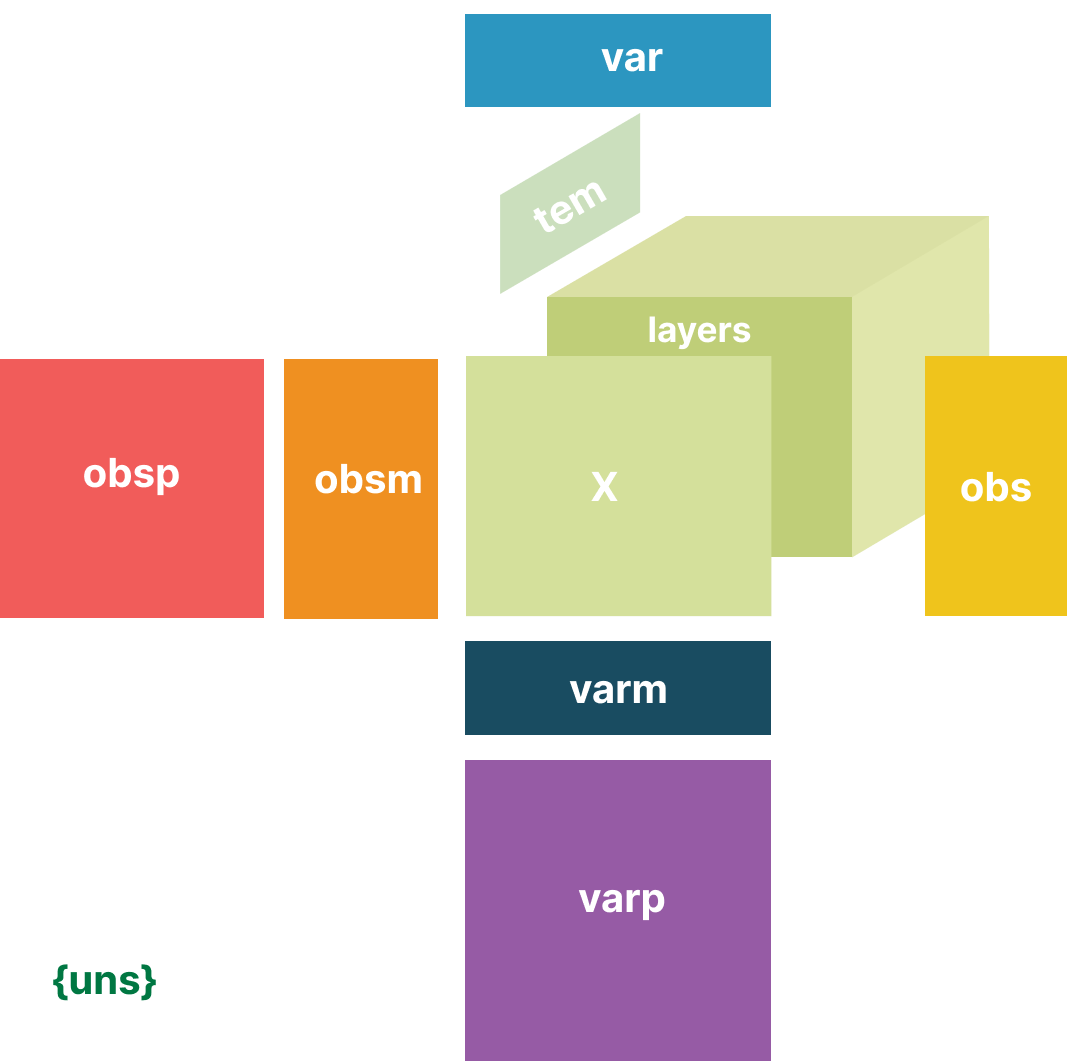
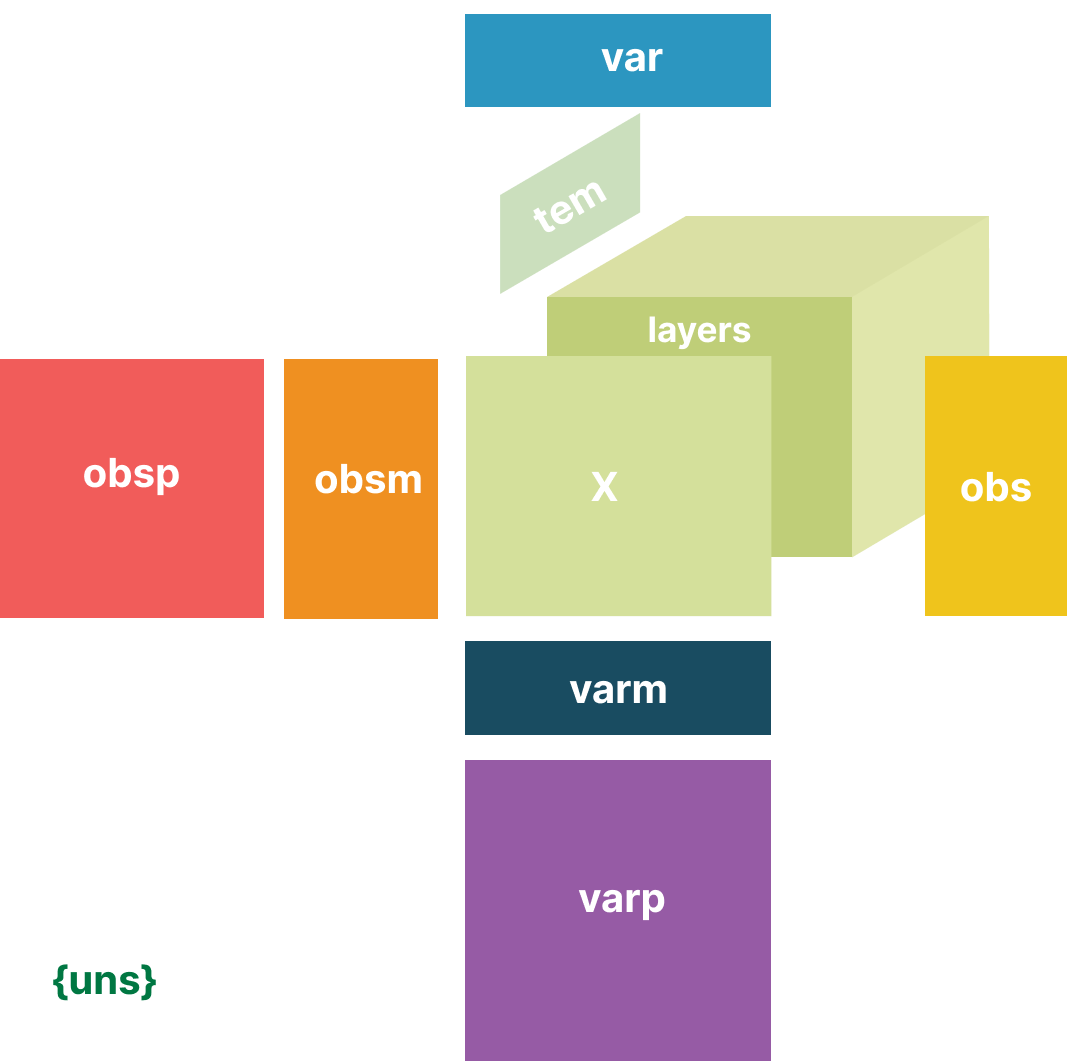
EHRData is extending AnnData [VRT+24], a Python package for handling annotated data that is commonly used for biomedical data, to further support time series data by representing data of \(n\) observations of \(d\) variables of \(t\) repeats.
It is the datastructure that the EHR analysis framework ehrapy operates on.
In clinical studies, each enrolled subject corresponds to an observation, each registered clinical parameter corresponds to a variable, and each visit corresponds to a repeat. Furthermore, we might have metadata for each of these axis. For example, for each subject, we might have additional static metadata, such as birthdata, or sex. For each registered clinical parameter, we might have metadata such as a concept identifier, a descriptive name, or the unit it was measured in. For the repeated measurements, we might have a descriptive name per measurement, or the number of weeks after study entry.
Initializing EHRData#
import numpy as np
import pandas as pd
import ehrdata as ed
Let’s start by building a basic EHRData object with two measurements, systolic and diastolic blood pressure of two individuals.
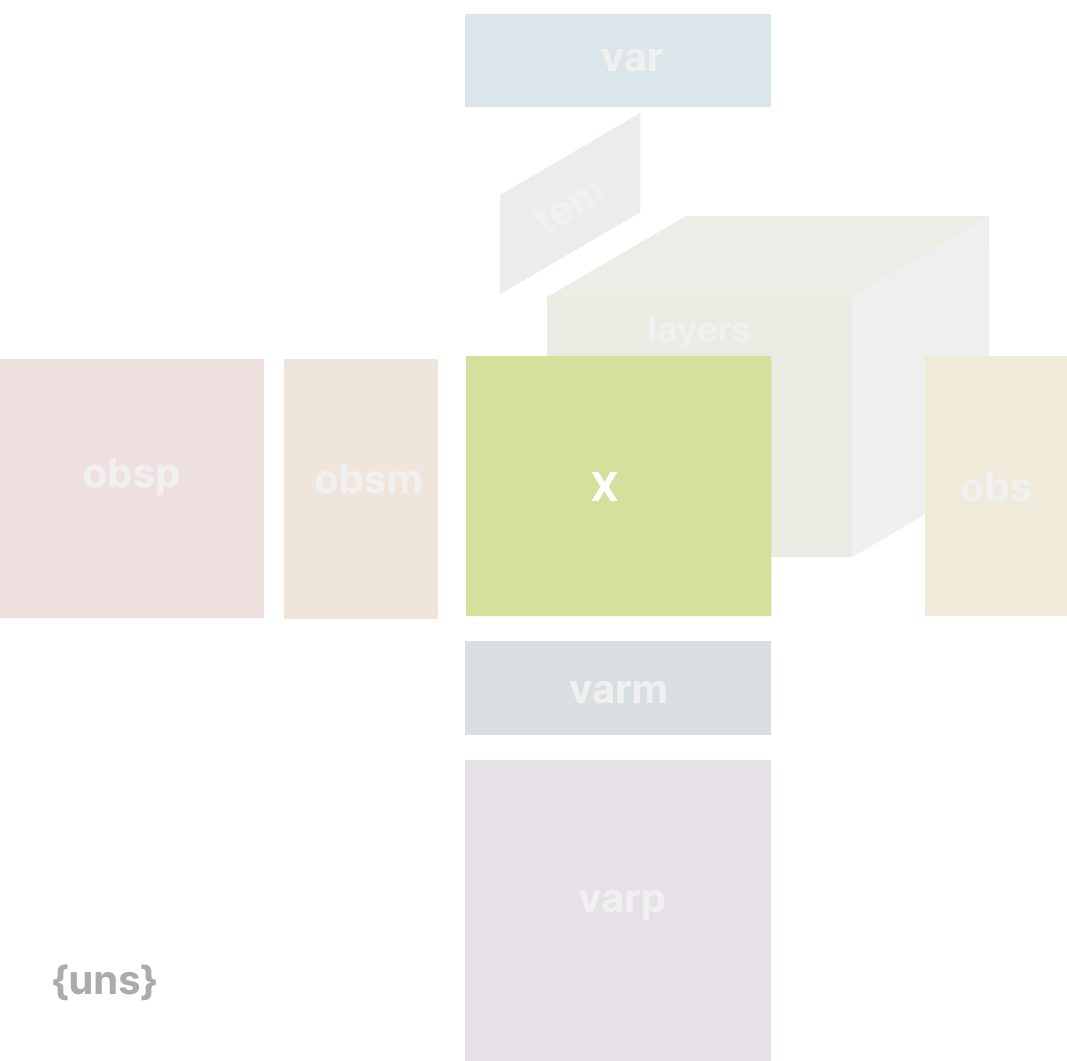
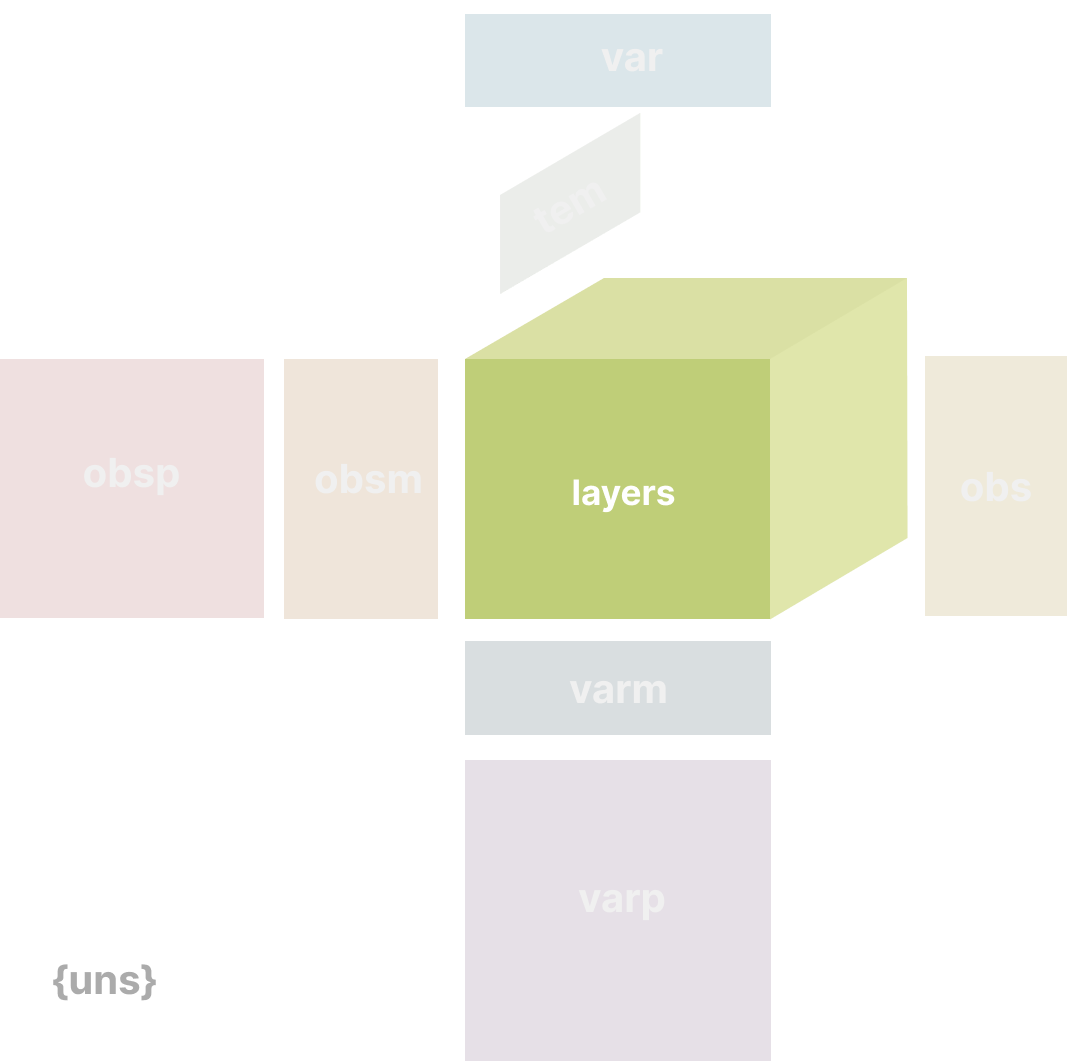
EHRData at its heart stores ndarrays (and others) in its .layers[<array_name>] attribute.
A special EHRData attribute is .X, which behaves like layers[<array_name>], and is used as default in many ehrapy functions if no array_name to look for in layers is not specified.
Currently, a limitation of .X is that it only supports 2D arrays.
measurements = np.array(
    [[120, 121], [81, 81]],
)

edata = ed.EHRData(
    X=measurements,
)
edata
EHRData object with n_obs × n_vars × n_t = 2 × 2 × 1
    shape of .X: (2, 2)
This initializes an EHRData object with the measurements numpy array as its X attribute.
edata.X
array([[120, 121],
       [ 81,  81]])
When we have measurements along a time course, we want to represent an axis of time (e.g. clinical visits, calendar time, …) and repeats of measurements. In the example above, the blood pressure measurements could be measured in a series of three visits.
repeated_measurements = np.array(
    [
        [
            [120, np.nan, 121],
            [81, np.nan, 81],
        ],
        [
            [130, 135, 125],
            [84, 81, 80],
        ],
    ]
)

edata = ed.EHRData(
    layers={"tem_data": repeated_measurements},
)
edata
EHRData object with n_obs × n_vars × n_t = 2 × 2 × 3
    layers: 'tem_data'
    shape of .tem_data: (2, 2, 3)
edata.layers["tem_data"]
array([[[120.,  nan, 121.],
        [ 81.,  nan,  81.]],

       [[130., 135., 125.],
        [ 84.,  81.,  80.]]])
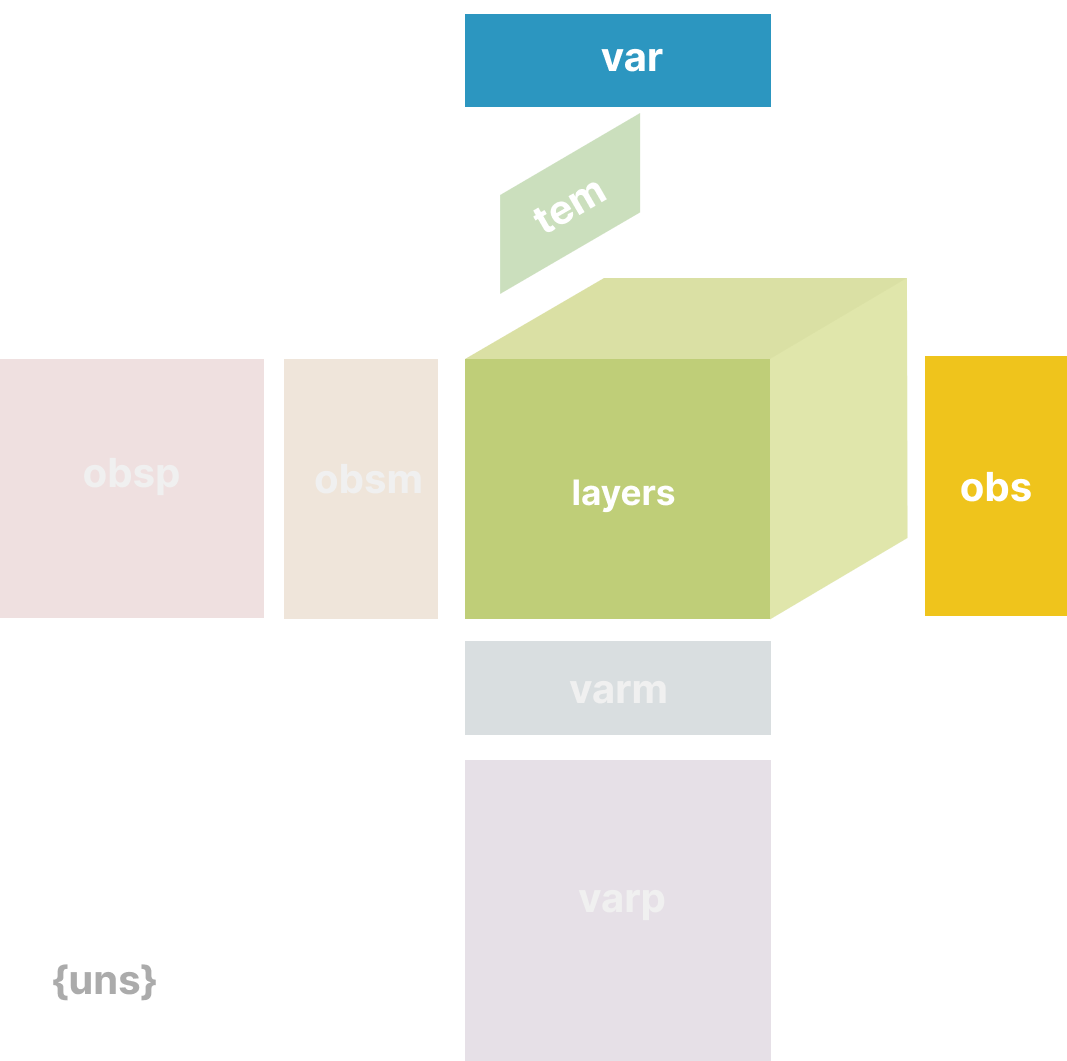
Now, we enrich this data together with additional information, using the obs, var, and tem fields of EHRData.
These fields are each a DataFrame that are aligned along the axes of the EHRData object.
the
obsfield stores static person-level metadatathe
varfield stores variable-level metadatathe
temfield stores time axis-level metadata
subjects = pd.DataFrame(
    {"subject_id": ["P001", "P002"], "birthdate": ["1980-01-01", "1975-05-15"], "gender": ["M", "F"]}
).set_index("subject_id")

clinical_parameters = pd.DataFrame(
    {
        "parameter_id": ["BP_Systolic", "BP_Diastolic"],
        "name": ["Systolic Blood Pressure", "Diastolic Blood Pressure"],
        "unit": ["mmHg", "mmHg"],
    }
).set_index("parameter_id")

visit_dates = pd.DataFrame({"visit_number": ["1", "2", "3"], "visit_id": ["V001", "V002", "V003"]}).set_index(
    "visit_number"
)
edata = ed.EHRData(
    layers={"tem_data": repeated_measurements},
    obs=subjects,
    var=clinical_parameters,
    tem=visit_dates,
)
edata
EHRData object with n_obs × n_vars × n_t = 2 × 2 × 3
    obs: 'birthdate', 'gender'
    var: 'name', 'unit'
    tem: '1', '2', '3'
    layers: 'tem_data'
    shape of .tem_data: (2, 2, 3)
Subsetting EHRData#
Subsetting with indices#
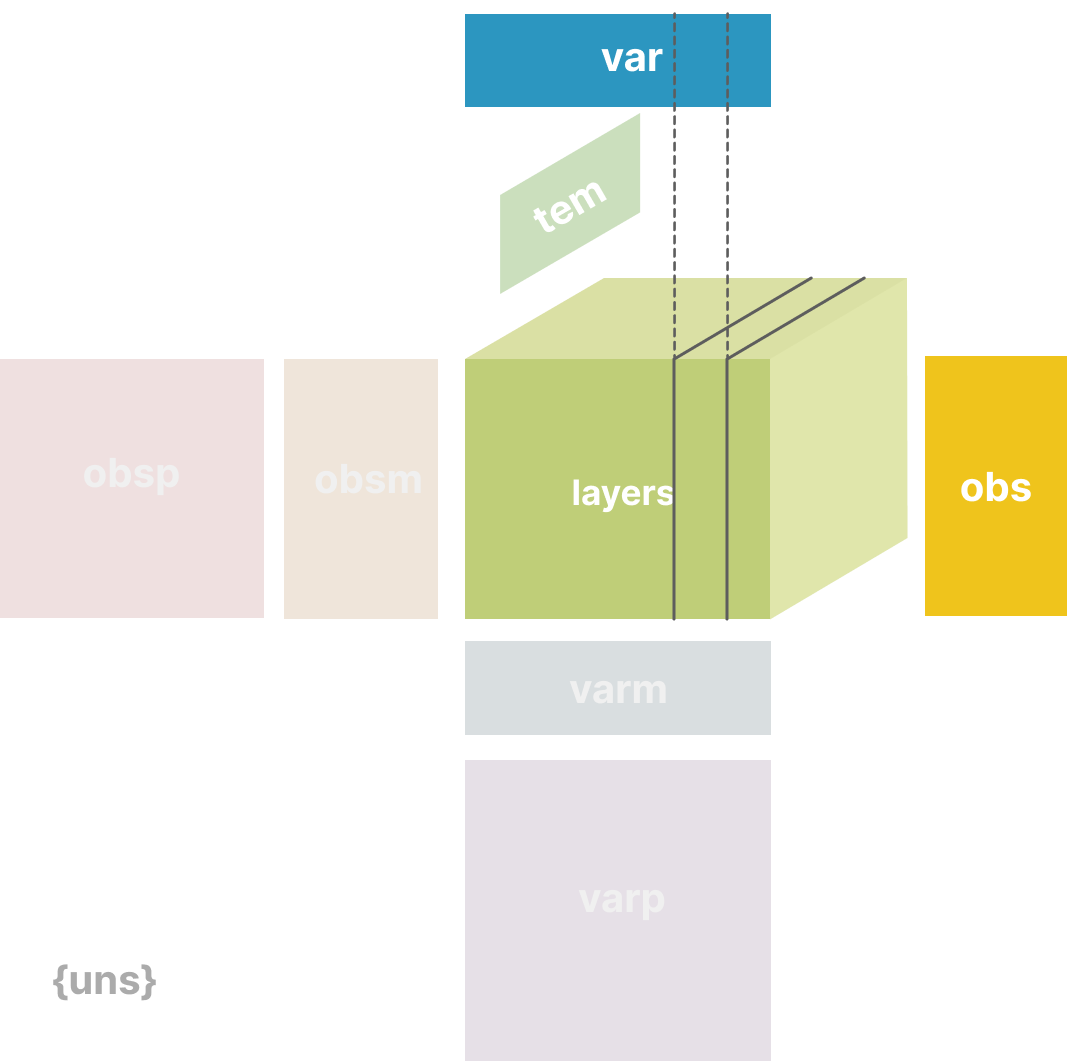
The index values can be used to subset the EHRData, which provides a view of the EHRData object.
We can imagine this to be useful to subset the AnnData to particular patients, variables, or time intervals of interest.
The rules for subsetting EHRData are quite similar to that of a Pandas DataFrame.
You can use values in the obs/var_names, boolean masks, or cell index integers.
edata.var_names.isin(["P001", "BP_Systolic"])
array([ True, False])
edata[:, edata.var_names.isin(["P001", "BP_Systolic"])]
View of EHRData object with n_obs × n_vars × n_t = 2 × 1 × 3
    obs: 'birthdate', 'gender'
    var: 'name', 'unit'
    tem: '1', '2', '3'
    layers: 'tem_data'
    shape of .tem_data: (2, 1, 3)
Subsetting using data from the aligned dataframes .obs, .var, or .tem#
We can also subset the EHRData using the metadata:
edata[edata.obs["gender"] == "F"]
View of EHRData object with n_obs × n_vars × n_t = 1 × 2 × 3
    obs: 'birthdate', 'gender'
    var: 'name', 'unit'
    tem: '1', '2', '3'
    layers: 'tem_data'
    shape of .tem_data: (1, 2, 3)
Observation/variable-level matrices#
We might also have metadata at either level that has many dimensions to it, such as a UMAP embedding of the data.
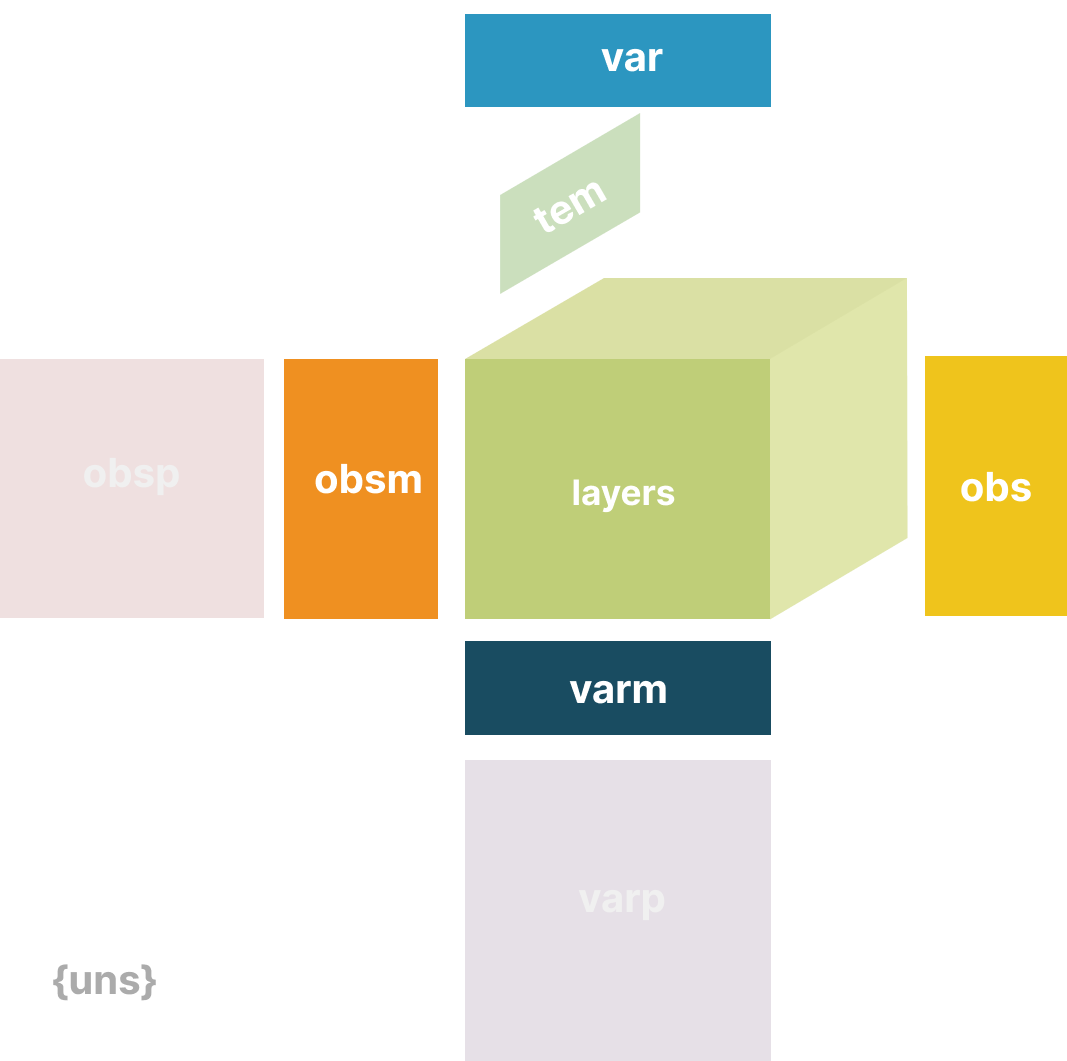
For this type of metadata, EHRData has the .obsm/.varm attributes.
We use keys to identify the different matrices we insert.
The restrictions of .obsm/.varm are, that the length of .obsm matrices must be equal to the number of observations as .n_obs and .varm matrices must be equal in length to .n_vars.
They can each independently have a different number of dimensions.
Let’s start with a randomly generated matrix that we can interpret as an UMAP embedding of the data we would like to store, as well as some random variable-level metadata:
edata.obsm["X_umap"] = np.random.normal(0, 1, size=(edata.n_obs, 2))
edata.varm["variable_stuff"] = np.random.normal(0, 1, size=(edata.n_vars, 5))
edata
EHRData object with n_obs × n_vars × n_t = 2 × 2 × 3
    obs: 'birthdate', 'gender'
    var: 'name', 'unit'
    tem: '1', '2', '3'
    obsm: 'X_umap'
    varm: 'variable_stuff'
    layers: 'tem_data'
    shape of .tem_data: (2, 2, 3)
A few more notes about .obsm/.varm
The “array-like” metadata can originate from a Pandas DataFrame, scipy sparse matrix, or numpy dense array.
When using scanpy, their values (columns) are not easily plotted, where instead items from
.obsare easily plotted on, e.g., UMAP plots.
Unstructured metadata#
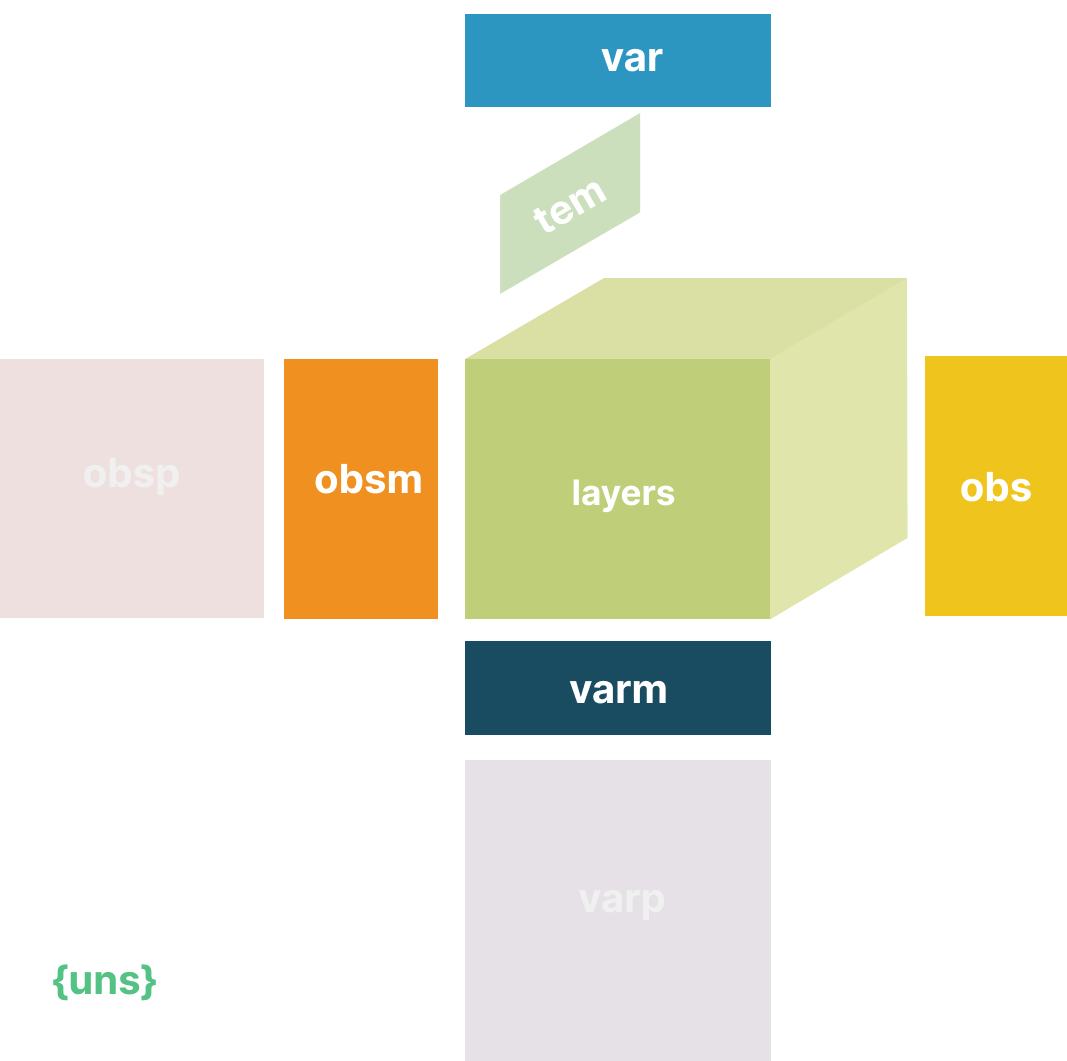
EHRData has .uns, which allows for any unstructured metadata. This can be anything, like a list or a dictionary with some general information that was useful in the analysis of our data.
edata.uns["random"] = [1, 2, 3]
edata
EHRData object with n_obs × n_vars × n_t = 2 × 2 × 3
    obs: 'birthdate', 'gender'
    var: 'name', 'unit'
    tem: '1', '2', '3'
    uns: 'random'
    obsm: 'X_umap'
    varm: 'variable_stuff'
    layers: 'tem_data'
    shape of .tem_data: (2, 2, 3)
Layers#
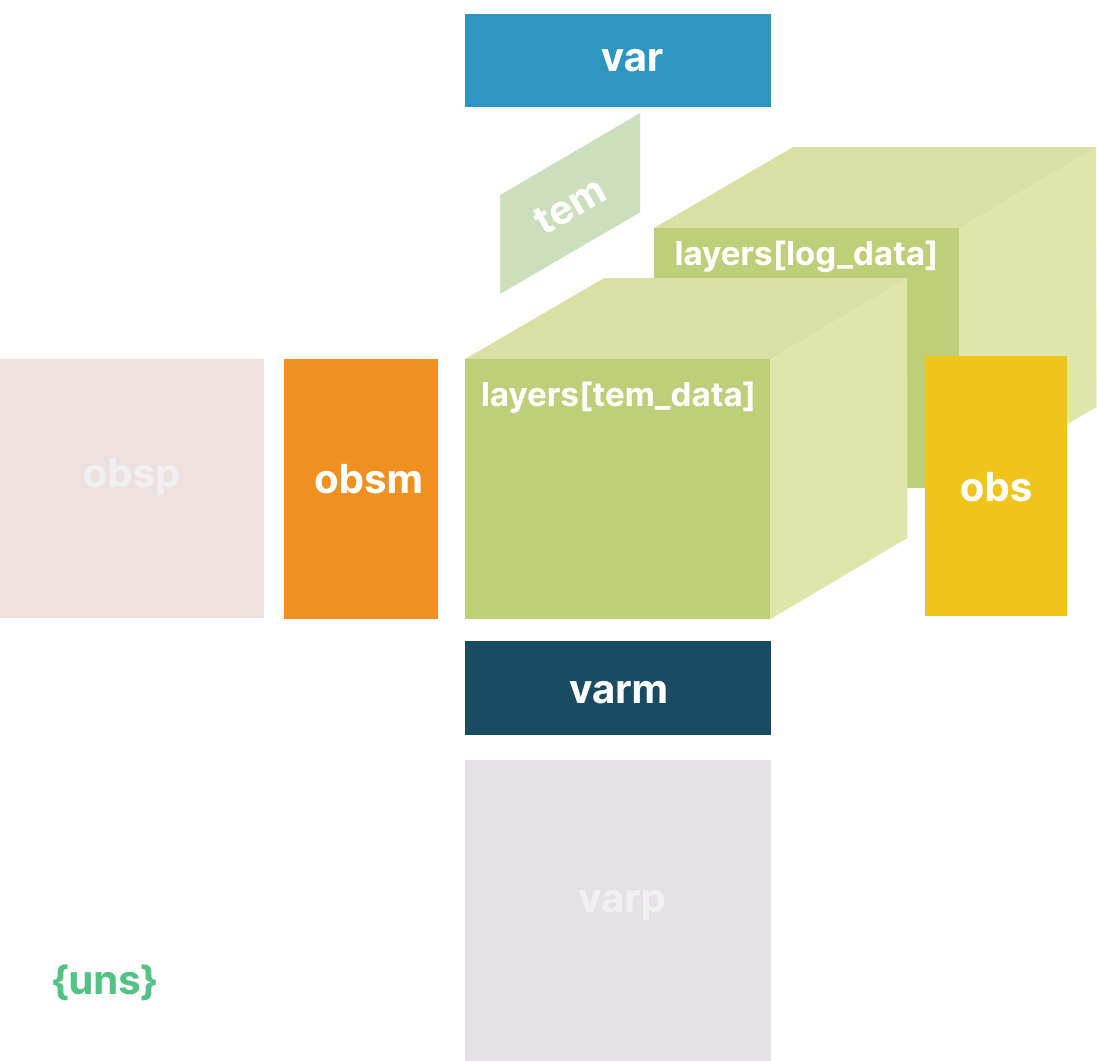
Finally, we may have different forms of our original core data, perhaps one that is normalized and one that is not. These can be stored in different layers in EHRData. As an example, we log transform the original data and store it in a layer:
edata.layers["log_data"] = np.log1p(edata.layers["tem_data"])
edata
EHRData object with n_obs × n_vars × n_t = 2 × 2 × 3
    obs: 'birthdate', 'gender'
    var: 'name', 'unit'
    tem: '1', '2', '3'
    uns: 'random'
    obsm: 'X_umap'
    varm: 'variable_stuff'
    layers: 'tem_data', 'log_data'
    shape of .tem_data: (2, 2, 3)
    shape of .log_data: (2, 2, 3)
Store flat values derived from longitudinal features#
A common operation is that we want to get for each feature, in our case mmHG, one number from the time series. We here consider the maximum. The median, the variance, or the slope of increase/deacrase along time are other examples of extractable summary statistics.
Such statistics can be stored in .layers as well, or in .X.
edata.layers["max_bp"] = np.max(edata.layers["tem_data"], axis=2)
edata.layers["min_bp"] = np.min(edata.layers["tem_data"], axis=2)
edata
EHRData object with n_obs × n_vars × n_t = 2 × 2 × 3
    obs: 'birthdate', 'gender'
    var: 'name', 'unit'
    tem: '1', '2', '3'
    uns: 'random'
    obsm: 'X_umap'
    varm: 'variable_stuff'
    layers: 'tem_data', 'log_data', 'max_bp', 'min_bp'
    shape of .tem_data: (2, 2, 3)
    shape of .log_data: (2, 2, 3)
    shape of .max_bp: (2, 2)
    shape of .min_bp: (2, 2)
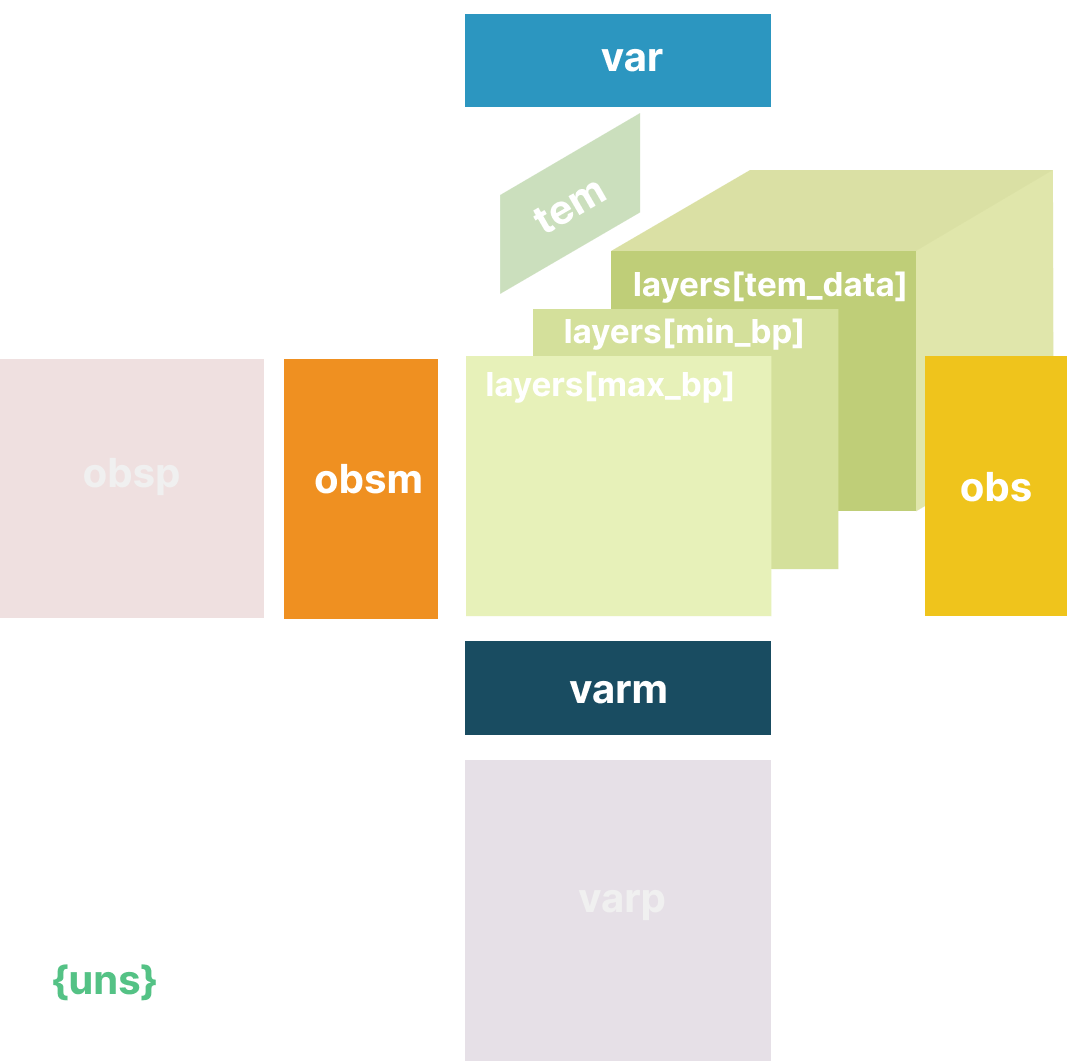
Many naturally aligned data aspects can be stored in an EHRData object.
Do you need to fill all slots? No.
Does it help to organize your data if you have more than a flat table? Probably yes.
Not allowed: Different 3rd dimensions#
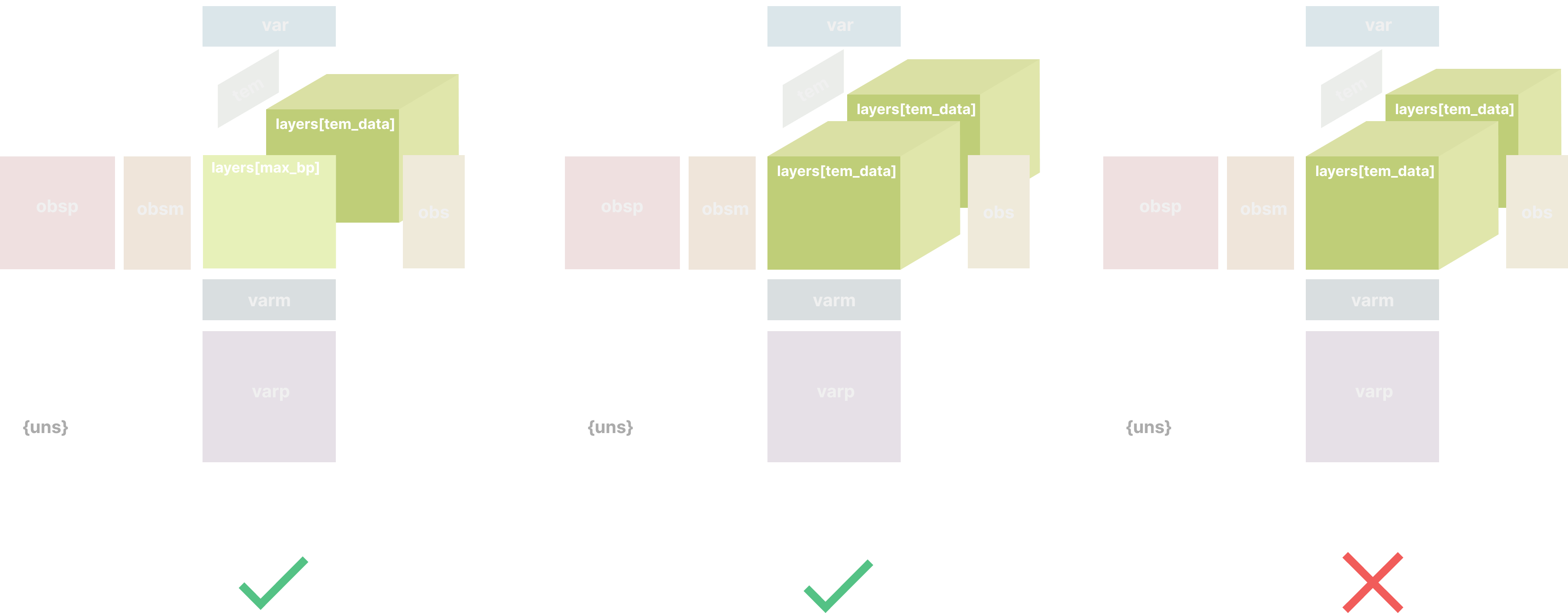
While arrays in .layers or .X always need to align along the .obs and the .var axes, EHRData allows the 3rd time dimension to be a specific integer and one.
Within one EHRData object, only one time dimension is allowed for arrays, but flat arrays can always be stored in the same object, too.
Writing the results to disk#
EHRData comes with a persistent HDF5-based file format: h5ad. If string columns with small number of categories aren’t yet categoricals, EHRData will auto-transform to categoricals.
edata.write("my_results.h5ad", compression="gzip")
Pandas DataFrame formats and EHRData#
Longitudinal data can be transformed between EHRData and a pandas DataFrame.
For this, the functions to_pandas() and from_pandas() are instrumental.
Two canonical ways to represent longitudinal data with a dataframe are supported: The long format, and the wide format.
The long format#
In the long format, the data is stored in a dataframe as a tuple (person, variable, measurement, time, value).
df_long = pd.DataFrame(
    {
        "observation_id": ["0", "0", "1", "1"],
        "variable": [
            "systolic_blood_pressure",
            "systolic_blood_pressure",
            "systolic_blood_pressure",
            "systolic_blood_pressure",
        ],
        "time": ["t_0", "t_1", "t_0", "t_2"],
        "value": [120, 125, 130, 135],
    }
)
df_long
| observation_id | variable | time | value | |
|---|---|---|---|---|
| 0 | 0 | systolic_blood_pressure | t_0 | 120 |
| 1 | 0 | systolic_blood_pressure | t_1 | 125 |
| 2 | 1 | systolic_blood_pressure | t_0 | 130 |
| 3 | 1 | systolic_blood_pressure | t_2 | 135 |
This dataframe format can easily be ingested into the EHRData format…
edata_from_long_df = ed.io.from_pandas(df_long, layer="tem_data", format="long")
edata_from_long_df
EHRData object with n_obs × n_vars × n_t = 2 × 1 × 3
    layers: 'tem_data'
    shape of .tem_data: (2, 1, 3)
… and from the EHRData format can be transformed back to a pandas DataFrame.
df_long_from_edata = ed.io.to_pandas(edata_from_long_df, layer="tem_data", format="long")
df_long_from_edata
| observation_id | variable | time | value | |
|---|---|---|---|---|
| 0 | 0 | systolic_blood_pressure | t_0 | 120.0 |
| 1 | 0 | systolic_blood_pressure | t_1 | 125.0 |
| 2 | 0 | systolic_blood_pressure | t_2 | NaN |
| 3 | 1 | systolic_blood_pressure | t_0 | 130.0 |
| 4 | 1 | systolic_blood_pressure | t_1 | NaN |
| 5 | 1 | systolic_blood_pressure | t_2 | 135.0 |
The wide format#
In the wide format, the data is stored in a dataframe with rows indicating the person, and columns indicating the variable as well as the time of measurement.
df_wide = pd.DataFrame(
    {
        "patient_id": ["0", "1"],
        "sex": ["F", "M"],
        "systolic_bp_t_0": [120, 130],
        "systolic_bp_t_2": [125, np.nan],  # the suffix strings are sorted lexicographically
        "systolic_bp_t_1": [np.nan, 135],
    }
)
df_wide
| patient_id | sex | systolic_bp_t_0 | systolic_bp_t_2 | systolic_bp_t_1 | |
|---|---|---|---|---|---|
| 0 | 0 | F | 120 | 125.0 | NaN |
| 1 | 1 | M | 130 | NaN | 135.0 |
This dataframe format can easily be ingested into the EHRData format…
edata_from_wide_df = ed.io.from_pandas(df_wide, layer="tem_data", format="wide", columns_obs_only=["patient_id", "sex"])
edata_from_wide_df
EHRData object with n_obs × n_vars × n_t = 2 × 1 × 3
    obs: 'patient_id', 'sex'
    layers: 'tem_data'
    shape of .tem_data: (2, 1, 3)
… and from the EHRData format can be transformed back to a pandas DataFrame.
df_from_edata = ed.io.to_pandas(edata_from_wide_df, layer="tem_data", format="wide", obs_cols=["patient_id", "sex"])
df_from_edata
| systolic_bp_t_0 | systolic_bp_t_1 | systolic_bp_t_2 | patient_id | sex | |
|---|---|---|---|---|---|
| 0 | 120.0 | NaN | 125.0 | 0 | F |
| 1 | 130.0 | 135.0 | NaN | 1 | M |
Advanced: Views of an EHRData object#
EHRData is straightforward to use and facilitates more reproducible analyses with it’s key-based storage.
We refer to the AnnData tutorials to better understand “views”, on-disk backing, and other details.
Note
Similar to numpy arrays, EHRData objects can either hold actual data or reference another EHRData object.
In the later case, they are referred to as “view”.
Subsetting EHRData objects always returns views, which has two advantages:
no new memory is allocated
it is possible to modify the underlying EHRData object
You can get an actual EHRData object from a view by calling .copy() on the view.
Usually, this is not necessary, as any modification of elements of a view (calling .[] on an attribute of the view) internally calls .copy() and makes the view an EHRData object that holds actual data.
See the example below.
Note
Indexing into AnnData will assume that integer arguments to [] behave like .iloc in pandas, whereas string arguments behave like .loc. AnnData always assumes string indices.
edata[1, 1]
View of EHRData object with n_obs × n_vars × n_t = 1 × 1 × 3
    obs: 'birthdate', 'gender'
    var: 'name', 'unit'
    tem: '1', '2', '3'
    uns: 'random'
    obsm: 'X_umap'
    varm: 'variable_stuff'
    layers: 'tem_data', 'log_data', 'max_bp', 'min_bp'
    shape of .tem_data: (1, 1, 3)
    shape of .log_data: (1, 1, 3)
    shape of .max_bp: (1, 1)
    shape of .min_bp: (1, 1)
This is a view! If we want an EHRData that holds the data in memory, we have to call .copy()
edata_subset = edata[1, 1].copy()
If you try to write to parts of a view of an AnnData, the content will be auto-copied and a data-storing object will be generated.
edata_subset = edata[["P001"], ["BP_Systolic"]]
edata_subset
View of EHRData object with n_obs × n_vars × n_t = 1 × 1 × 3
    obs: 'birthdate', 'gender'
    var: 'name', 'unit'
    tem: '1', '2', '3'
    uns: 'random'
    obsm: 'X_umap'
    varm: 'variable_stuff'
    layers: 'tem_data', 'log_data', 'max_bp', 'min_bp'
    shape of .tem_data: (1, 1, 3)
    shape of .log_data: (1, 1, 3)
    shape of .max_bp: (1, 1)
    shape of .min_bp: (1, 1)
edata_subset.obs["foo"] = "bar"
Now edata_subset stores the actual data and is no longer just a reference to edata.
edata_subset
EHRData object with n_obs × n_vars × n_t = 1 × 1 × 3
    obs: 'birthdate', 'gender', 'foo'
    var: 'name', 'unit'
    tem: '1', '2', '3'
    uns: 'random'
    obsm: 'X_umap'
    varm: 'variable_stuff'
    layers: 'tem_data', 'log_data', 'max_bp', 'min_bp'
    shape of .tem_data: (1, 1, 3)
    shape of .log_data: (1, 1, 3)
    shape of .max_bp: (1, 1)
    shape of .min_bp: (1, 1)
Next Tutorial#
Continue with Real Dataset Example: PhysioNet 2019 to learn how EHRData structures real ICU data from the PhysioNet 2019 Challenge.
Further Resources#
AnnData Documentation - Learn more about the AnnData data structure that EHRData extends
PhysioNet 2019 Challenge - The example dataset used in this tutorial series