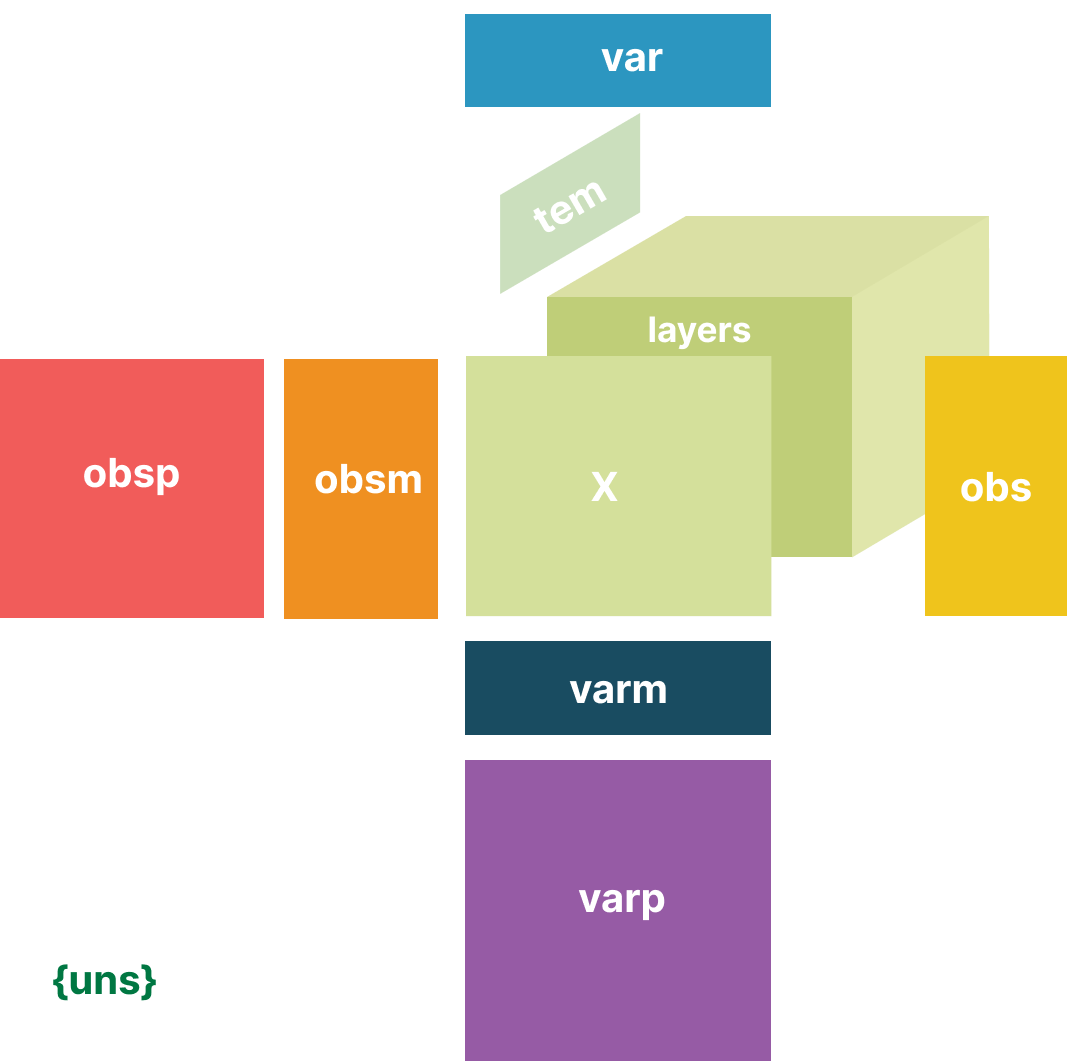
Loading Data from OMOP Common Data Model into EHRData#
This tutorial demonstrates how to load electronic health record data from the OMOP Common Data Model (CDM) with ehrdata.
What is OMOP CDM?#
The OMOP CDM standardizes observational healthcare data across different sources to enable reproducible, multi-site analyses.
We’ll use the MIMIC-IV demo dataset (100 patients) in OMOP format as our example [KTP+21] [GAG+00].
Setup and Data Download#
Note
ehrdata provides ready-to-use OMOP datasets!
The ed.dt.mimic_iv_omop() function automatically:
Downloads a real data sample from MIMIC IV in an OMOP table format
Loads the tables into a database connection
Makes them ready for you to construct EHRData objects
This workflow mirrors how ehrdata can be applied to any dataset in the OMOP CDM format:
(Download OMOP tables) → Connect to database → Create EHRData structure (using arguments explained below)
import ehrdata as ed
import duckdb
We’ll use ehrdata’s built-in mimic_iv_omop() function, which downloads the data as OMOP tables and loads them into a database connection:
# Create an in-memory database
con = duckdb.connect(":memory:")

# Download data and load OMOP tables into the database
# This creates tables like: person, measurement, observation, etc.
data_path = ed.dt.mimic_iv_omop(backend_handle=con)
print(f"Data downloaded to: {data_path}")
Quick Look at OMOP Tables#
The OMOP CDM organizes data into standardized tables. Let’s explore them:
# See what tables we have
tables = con.execute("SHOW TABLES").df()
print(f"Number of tables: {len(tables)}")
print("\nAvailable tables:")
print(tables)
Number of tables: 30

Available tables:
                    name
0              care_site
1             cdm_source
2                 cohort
3      cohort_definition
4                concept
5   concept_relationship
6          condition_era
7   condition_occurrence
8                   cost
9                  death
10       device_exposure
11              dose_era
12              drug_era
13         drug_exposure
14     fact_relationship
15              location
16           measurement
17              metadata
18                  note
19              note_nlp
20           observation
21    observation_period
22     payer_plan_period
23                person
24  procedure_occurrence
25              provider
26              specimen
27          visit_detail
28      visit_occurrence
29            vocabulary
The person table#
The person table contains demographic information about each patient.
person_df = con.execute("SELECT * FROM person LIMIT 5").df()
person_df.head()
| person_id | gender_concept_id | year_of_birth | month_of_birth | day_of_birth | birth_datetime | race_concept_id | ethnicity_concept_id | location_id | provider_id | care_site_id | person_source_value | gender_source_value | gender_source_concept_id | race_source_value | race_source_concept_id | ethnicity_source_value | ethnicity_source_concept_id | |
|---|---|---|---|---|---|---|---|---|---|---|---|---|---|---|---|---|---|---|
| 0 | 3589912774911670296 | 8507 | 2095 | None | None | NaT | 0 | 38003563 | None | None | None | 10009628 | M | 0 | None | 0 | HISPANIC/LATINO | 2000001408 |
| 1 | -3210373572193940939 | 8507 | 2079 | None | None | NaT | 0 | 38003563 | None | None | None | 10011398 | M | 0 | None | 0 | HISPANIC/LATINO | 2000001408 |
| 2 | -775517641933593374 | 8507 | 2149 | None | None | NaT | 8516 | 0 | None | None | None | 10004235 | M | 0 | BLACK/AFRICAN AMERICAN | 2000001406 | None | 0 |
| 3 | -2575767131279873665 | 8507 | 2050 | None | None | NaT | 8516 | 0 | None | None | None | 10024043 | M | 0 | BLACK/AFRICAN AMERICAN | 2000001406 | None | 0 |
| 4 | -8970844422700220177 | 8507 | 2114 | None | None | NaT | 8527 | 0 | None | None | None | 10038933 | M | 0 | WHITE | 2000001404 | None | 0 |
The measurement table#
The measurement table contains lab values, vital signs, and other measurements:
measurement_df = con.execute("SELECT * FROM measurement LIMIT 5").df()
measurement_df.head()
| measurement_id | person_id | measurement_concept_id | measurement_date | measurement_datetime | measurement_time | measurement_type_concept_id | operator_concept_id | value_as_number | value_as_concept_id | unit_concept_id | range_low | range_high | provider_id | visit_occurrence_id | visit_detail_id | measurement_source_value | measurement_source_concept_id | unit_source_value | value_source_value | |
|---|---|---|---|---|---|---|---|---|---|---|---|---|---|---|---|---|---|---|---|---|
| 0 | 7620661609057829801 | -7437341330444582833 | 3007913 | 2113-09-14 | 2113-09-14 10:41:00 | None | 32856 | None | 586.0 | <NA> | 8876 | NaN | NaN | None | 3697313480337443666 | None | 50801 | 2000001001 | mm Hg | 586 |
| 1 | -6166868866082303206 | -2312013739856114142 | 3012501 | 2116-07-05 | 2116-07-05 05:51:00 | None | 32856 | None | -4.0 | <NA> | 9557 | NaN | NaN | None | -5005846256467230136 | None | 50802 | 2000001002 | mEq/L | -4 |
| 2 | -5240588523649662838 | -4234372750442829205 | 3012501 | 2154-01-02 | 2154-01-02 20:18:00 | None | 32856 | None | -2.0 | <NA> | 9557 | NaN | NaN | None | -5317261811030552609 | None | 50802 | 2000001002 | mEq/L | -2 |
| 3 | 6455538495061268502 | 8805478484003283429 | 3012501 | 2114-06-20 | 2114-06-20 09:59:00 | None | 32856 | None | 3.0 | <NA> | 9557 | NaN | NaN | None | 4821424463988433938 | None | 50802 | 2000001002 | mEq/L | 3 |
| 4 | 8972684215776493449 | 6339505631013617478 | 3012501 | 2111-11-15 | 2111-11-15 03:09:00 | None | 32856 | None | -2.0 | <NA> | 9557 | NaN | NaN | None | -6354047184485090226 | None | 50802 | 2000001002 | mEq/L | -2 |
Building an EHRData Object from OMOP#
Now let’s construct an EHRData object from the OMOP database. We’ll do this in three steps:
Setup rows (
.obs) - Define what each row represents (patients, visits, etc.)Setup variables (
.varand.layers) - Extract clinical measurements as time seriesExplore the result - See how OMOP data maps to EHRData structure
Step 1: Setup rows (.obs)#
The first step is to define what each row in our final EHRData object should represent.
We use ed.io.omop.setup_obs() for this.
In OMOP, we can choose different observation units:
"person"- Each row is one patient"person_visit_occurrence"- Each row is one hospital visit"person_observation_period"- Each row is one observation period"person_cohort”` - Each row is a person of a cohort
Important
The choice of observation table determines the reference timepoint (t=0) for time series data:
Observation Table |
Timepoint 0 Reference |
|---|---|
|
Patient’s birth date |
|
Start of the hospital visit |
|
Start of the observation period |
|
Start of the cohort |
This allows you to leverage the temporal information already defined in the OMOP database to align your time series data to clinically meaningful reference points.
For this tutorial, we’ll use "person_visit_occurrence" because we care about monitoring and modeling individual hospital visits. This is particularly useful when:
Patients have multiple hospital encounters
Each visit has distinct clinical characteristics
You want to predict outcomes at the visit level (e.g., in-hospital mortality, length of stay)
Let’s see the first step in action:
# Step 1: Setup observations from the person table
edata = ed.io.omop.setup_obs(
    backend_handle=con,
    observation_table="person_visit_occurrence",
    death_table=True,  # Include death information
)
edata
EHRData object with n_obs × n_vars × n_t = 852 × 0 × 1
    obs: 'person_id', 'gender_concept_id', 'year_of_birth', 'month_of_birth', 'day_of_birth', 'birth_datetime', 'race_concept_id', 'ethnicity_concept_id', 'location_id', 'provider_id', 'care_site_id', 'person_source_value', 'gender_source_value', 'gender_source_concept_id', 'race_source_value', 'race_source_concept_id', 'ethnicity_source_value', 'ethnicity_source_concept_id', 'visit_occurrence_id', 'person_id_1', 'visit_concept_id', 'visit_start_date', 'visit_start_datetime', 'visit_end_date', 'visit_end_datetime', 'visit_type_concept_id', 'provider_id_1', 'care_site_id_1', 'visit_source_value', 'visit_source_concept_id', 'admitting_source_concept_id', 'admitting_source_value', 'discharge_to_concept_id', 'discharge_to_source_value', 'preceding_visit_occurrence_id', 'death_date', 'death_datetime', 'death_type_concept_id', 'cause_concept_id', 'cause_source_value', 'cause_source_concept_id'
    uns: 'omop_io_observation_table'
Let’s examine the .obs table - it contains patient demographics from the OMOP person table:
edata.obs.head()
| person_id | gender_concept_id | year_of_birth | month_of_birth | day_of_birth | birth_datetime | race_concept_id | ethnicity_concept_id | location_id | provider_id | ... | admitting_source_value | discharge_to_concept_id | discharge_to_source_value | preceding_visit_occurrence_id | death_date | death_datetime | death_type_concept_id | cause_concept_id | cause_source_value | cause_source_concept_id | |
|---|---|---|---|---|---|---|---|---|---|---|---|---|---|---|---|---|---|---|---|---|---|
| 0 | -4502092208250381979 | 8532 | 2071 | None | None | NaT | 8527 | 0 | None | None | ... | TRANSFER FROM HOSPITAL | 581476 | HOME HEALTH CARE | <NA> | NaT | NaT | NaN | NaN | NaN | NaN |
| 1 | 4239478333578644568 | 8507 | 2111 | None | None | NaT | 8527 | 0 | None | None | ... | PHYSICIAN REFERRAL | 581476 | HOME | <NA> | NaT | NaT | NaN | NaN | NaN | NaN |
| 2 | -8090189584974691216 | 8507 | 2118 | None | None | NaT | 8527 | 0 | None | None | ... | EMERGENCY ROOM | 581476 | HOME | <NA> | NaT | NaT | NaN | NaN | NaN | NaN |
| 3 | 2188642953583197091 | 8532 | 2102 | None | None | NaT | 8527 | 0 | None | None | ... | None | <NA> | None | -6726268352887624443 | NaT | NaT | NaN | NaN | NaN | NaN |
| 4 | 3129727379702505063 | 8532 | 2145 | None | None | NaT | 8516 | 0 | None | None | ... | EMERGENCY ROOM | <NA> | None | <NA> | NaT | NaT | NaN | NaN | NaN | NaN |
5 rows × 41 columns
We can find person-level information here: columns such as gender_concept_id, and year_of_birth have been loaded from the person table.
We can further find visit-level information:
edata.obs.iloc[:, 18:35].head()
| visit_occurrence_id | person_id_1 | visit_concept_id | visit_start_date | visit_start_datetime | visit_end_date | visit_end_datetime | visit_type_concept_id | provider_id_1 | care_site_id_1 | visit_source_value | visit_source_concept_id | admitting_source_concept_id | admitting_source_value | discharge_to_concept_id | discharge_to_source_value | preceding_visit_occurrence_id | |
|---|---|---|---|---|---|---|---|---|---|---|---|---|---|---|---|---|---|
| 0 | -9176297757944464068 | -4502092208250381979 | 581385 | 2154-02-05 | 2154-02-05 17:09:00 | 2154-02-09 | 2154-02-09 15:15:00 | 32817 | None | None | 10018328|26706939 | 2000001807 | 8717 | TRANSFER FROM HOSPITAL | 581476 | HOME HEALTH CARE | <NA> |
| 1 | -9149771978458038515 | 4239478333578644568 | 8883 | 2177-03-12 | 2177-03-12 07:15:00 | 2177-03-19 | 2177-03-19 14:25:00 | 32817 | None | None | 10022880|27708593 | 2000001808 | 38004207 | PHYSICIAN REFERRAL | 581476 | HOME | <NA> |
| 2 | -9133360720296560252 | -8090189584974691216 | 8870 | 2174-05-26 | 2174-05-26 04:20:00 | 2174-05-31 | 2174-05-31 14:15:00 | 32817 | None | None | 10009049|22995465 | 2000001806 | 8870 | EMERGENCY ROOM | 581476 | HOME | <NA> |
| 3 | -9128519808785176541 | 2188642953583197091 | 38004207 | 2146-08-26 | 2146-08-26 15:36:00 | 2146-08-26 | 2146-08-26 15:36:00 | 32817 | None | None | 10008287|2146-08-26 | 2000001801 | <NA> | None | <NA> | None | -6726268352887624443 |
| 4 | -9127810274408915712 | 3129727379702505063 | 581385 | 2197-04-16 | 2197-04-16 22:57:00 | 2197-04-17 | 2197-04-17 09:48:00 | 32817 | None | None | 10002930|25282382 | 2000001805 | 8870 | EMERGENCY ROOM | <NA> | None | <NA> |
Since we used the visit_occurrence table to define our rows.
Particularly interesting here is the visit_concept_id, encoding information about what type the visit is, as well as the visit_start_datetime.
Finally, the .obs column contains information about a persons death:
edata.obs.iloc[:, 35:].head(12)
| death_date | death_datetime | death_type_concept_id | cause_concept_id | cause_source_value | cause_source_concept_id | |
|---|---|---|---|---|---|---|
| 0 | NaT | NaT | NaN | NaN | NaN | NaN |
| 1 | NaT | NaT | NaN | NaN | NaN | NaN |
| 2 | NaT | NaT | NaN | NaN | NaN | NaN |
| 3 | NaT | NaT | NaN | NaN | NaN | NaN |
| 4 | NaT | NaT | NaN | NaN | NaN | NaN |
| 5 | NaT | NaT | NaN | NaN | NaN | NaN |
| 6 | NaT | NaT | NaN | NaN | NaN | NaN |
| 7 | NaT | NaT | NaN | NaN | NaN | NaN |
| 8 | NaT | NaT | NaN | NaN | NaN | NaN |
| 9 | NaT | NaT | NaN | NaN | NaN | NaN |
| 10 | NaT | NaT | NaN | NaN | NaN | NaN |
| 11 | 2155-12-07 | 2155-12-07 15:30:00 | 32817.0 | 0.0 | None | 0.0 |
Step 2: Setup Variables (.var and .layers)#
Now we extract clinical measurements from the OMOP measurement table and organize them as time series data.
We need to specify:
data_tables: Which OMOP tables to use (e.g.,measurement,observation). Here, we are interested in themeasurementtable.data_field_to_keep: Which field contains the values we want to extract (e.g.,"value_as_number").time_precision: Whether to look fordateordatetimefields in the OMOP tables. Since we care about hourly intervals,datetimeis more suitable.interval_lengthandnum_intervals: How to discretize time. Here, we choose to create intervals of 1h, and create 24 of these intervals. This monitors the first 24h after the beginning of the visit stay here.
edata = ed.io.omop.setup_variables(
    edata=edata,
    layer="tem_data",
    backend_handle=con,
    data_tables=["measurement"],
    data_field_to_keep=["value_as_number"],
    time_precision="datetime",
    interval_length_number=1,
    interval_length_unit="h",
    num_intervals=24,
)
Step 3: Explore the Result#
Let’s examine what was constructed from the OMOP database:
First, let’s compare the original OMOP person table with the .obs attribute of our EHRData:
edata.obs[["person_id", "visit_occurrence_id", "visit_start_datetime", "gender_source_value", "year_of_birth"]]
| person_id | visit_occurrence_id | visit_start_datetime | gender_source_value | year_of_birth | |
|---|---|---|---|---|---|
| 0 | -4502092208250381979 | -9176297757944464068 | 2154-02-05 17:09:00 | F | 2071 |
| 1 | 4239478333578644568 | -9149771978458038515 | 2177-03-12 07:15:00 | M | 2111 |
| 2 | -8090189584974691216 | -9133360720296560252 | 2174-05-26 04:20:00 | M | 2118 |
| 3 | 2188642953583197091 | -9128519808785176541 | 2146-08-26 15:36:00 | F | 2102 |
| 4 | 3129727379702505063 | -9127810274408915712 | 2197-04-16 22:57:00 | F | 2145 |
| ... | ... | ... | ... | ... | ... |
| 847 | 7918537411740862407 | 9159184765222535078 | 2132-02-12 09:43:00 | F | 2055 |
| 848 | -626229666378242477 | 9165125063680661115 | 2174-11-28 10:30:00 | M | 2117 |
| 849 | 4985579811051920670 | 9197703010583516730 | 2112-02-05 14:48:00 | F | 2064 |
| 850 | 7131048714591189903 | 9197704996243617072 | 2191-11-18 15:00:00 | M | 2133 |
| 851 | 4985579811051920670 | 9218061359648594772 | 2111-06-22 10:37:00 | F | 2064 |
852 rows × 5 columns
print(f"Total patients: {edata.obs['person_id'].nunique()}")
print(f"Total visits: {len(edata)}")
Total patients: 100
Total visits: 852
The .var table contains information about each clinical variable (mapped from OMOP concepts):
edata.var.head(10)
| data_table_concept_id | |
|---|---|
| 0 | 0 |
| 1 | 1175625 |
| 2 | 3000067 |
| 3 | 3000068 |
| 4 | 3000099 |
| 5 | 3000285 |
| 6 | 3000330 |
| 7 | 3000348 |
| 8 | 3000456 |
| 9 | 3000461 |
Understanding .layers - Time Series Data#
The .layers tensor contains the time series data with shape (visits × variables × time).
edata.layers
Layers3D with keys: tem_data
print(f"edata.layers['tem_data'] shape: {edata.layers['tem_data'].shape}")
print(f"  → {edata.layers['tem_data'].shape[0]} visits")
print(f"  → {edata.layers['tem_data'].shape[1]} variables")
print(f"  → {edata.layers['tem_data'].shape[2]} time intervals")
edata.layers['tem_data'] shape: (852, 450, 24)
  → 852 visits
  → 450 variables
  → 24 time intervals
Let’s explore this for a specific visit, and the measurement concept id 3016723, which represents a measurement of Creatinine [Mass/volume] in Serum or Plasma.
Note
You can look up concept ids such as 3016723 using OHDSI’s Athena.
visit_occurrence_id = -9149771978458038515
variable_concept_id = 3016723

visit_index = edata.obs["visit_occurrence_id"] == visit_occurrence_id
variable_index = edata.var["data_table_concept_id"] == variable_concept_id

patient_id = edata.obs[visit_index]["person_id"]
visit_id = edata.obs[visit_index]["visit_occurrence_id"]
visit_start = edata.obs[visit_index]["visit_start_datetime"]


print(f"Example: Visit {visit_occurrence_id} (Patient {patient_id})")
print(f"Visit start: {visit_start}")

# Show measurements for this visit from the database
print("\nOriginal measurements from OMOP for this visit:")
measurements = con.execute(f"""
    SELECT measurement_datetime, measurement_concept_id, value_as_number
    FROM measurement
    WHERE visit_occurrence_id = {visit_occurrence_id}
    AND measurement_concept_id = {variable_concept_id}
    ORDER BY measurement_datetime
    LIMIT 1
""").df()

measurements
Example: Visit -9149771978458038515 (Patient 1    4239478333578644568
Name: person_id, dtype: int64)
Visit start: 1   2177-03-12 07:15:00
Name: visit_start_datetime, dtype: datetime64[us]

Original measurements from OMOP for this visit:
| measurement_datetime | measurement_concept_id | value_as_number | |
|---|---|---|---|
| 0 | 2177-03-12 12:47:00 | 3016723 | 1.1 |
Now let’s see how to access this data in the .layers tensor:
Looking at the measurement above:
Visit start: 2177-03-12 07:15:00
Measurement time: 2177-03-12 12:47:00
Time elapsed: ~5.5 hours (5 hours and 32 minutes)
This measurement falls into interval 5 (the time bin from 5-6 hours after visit start). Since we’re using 1-hour intervals starting from the visit start time, the measurement at 5.5 hours gets aggregated into the 6th hourly bin (index 5, since we start counting from 0).
print(edata[visit_index, variable_index, :].layers["tem_data"])
[[[nan nan nan nan nan 1.1 nan nan nan nan nan nan nan nan nan nan nan
   nan nan nan nan nan nan nan]]]
ehrapy provides functions for exploration, vizualisation, and analysis of data in the EHRData structure - check out its tutorials for insights that do not rely on the basic print statements we used here for simplicity.
How OMOP Maps to EHRData#
Here’s how the OMOP CDM tables map to the EHRData structure:
OMOP CDM |
EHRData |
Description |
|---|---|---|
|
|
Each patient becomes an observation |
|
|
Demographics (age, gender, etc.) |
|
|
Each unique concept_id becomes a variable |
|
|
Time series data (patients × variables × time) |
|
|
Concept names and metadata |
Time intervals |
|
Discretized time points |
Key transformations:
OMOP’s long format (many rows per patient) → EHRData’s tensor format (3D array)
OMOP’s timestamp-based data → Discretized time intervals
OMOP concept IDs → Human-readable variable names (via enrichment)
Next Tutorial#
Continue with OMOP Machine Learning to learn how ehrdata quickstarts ML workflows based on an OMOP dataset.
Further Resources#
The Book of OHDSI - Comprehensive guide to OHDSI and the OMOP Common Data Model
OMOP CDM Website - Official OHDSI data standardization resources